
YAVACADO turned our technical equipment catalog into a clear, professional website that our team can manage. The CMS and CRM integration make it easier to present products, process enquiries, and support clinics from the first contact.
4
min to read
Write Website Case Studies That Explain the Work Behind the Screens

Educational
Web design
Explore all
December 1, 2025
Create useful case studies with a clear challenge, specific decisions, annotated visuals and honest evidence of what the project delivered.
In this article
Reviewed 12 September 2026.
A screenshot shows what a website looks like. A case study explains why the work mattered and how decisions were made. Prospective clients need both, especially when they are comparing agencies with visually strong portfolios.
Describe the starting point precisely
Introduce the business, the audience and the constraint that shaped the project. The constraint could be an awkward editing workflow, disconnected service pages or a platform move. Keep background information relevant to the website decision rather than retelling the company’s entire history.
Define your role. If a client supplied the design and your team developed it, say so. If another partner handled strategy or copy, acknowledge that contribution. Clear attribution helps readers understand what they can hire you to do and makes the case study more credible.
Show a decision and its consequence
Choose two or three decisions that reveal useful thinking. Explain the alternatives and why one approach fit the project. For example, a team may use structured CMS fields for repeatable project information while leaving the narrative in a rich-text field.
Connect each decision to the constraint it addressed. Avoid presenting the technology stack as the explanation. A tool name only becomes useful when the reader understands the job it performed. Where an approach involves a trade-off, explain it without turning the case study into a record of every internal discussion.
Evidence to collect before writing a case studyEvidenceWhat it can supportWhat to recordApproved design and buildDelivered scopeYour role and collaboratorsEditor demonstrationA working publishing workflowThe task completedClient testimonialThe client’s stated experienceExact wording and permissionAnalytics comparisonA measured changeDates, definition and source
Give images a specific job
Use a broad view to introduce the result, then closer views to explain a content or interaction decision. Add captions describing what readers should notice. A mobile screenshot is useful when it demonstrates how a demanding layout was adapted, rather than simply repeating the desktop page at another size.
Keep essential explanation in text. If an image contains a complex process or result, write the meaning beside it. Check that images remain readable on small screens. A full-page screenshot reduced to a narrow column rarely communicates the detail its author intended.
Separate delivery evidence from business results
Document what was delivered, what the client reported and what was measured. If a metric is available, include its period, baseline and source. A conversion percentage without that context can be misleading. If no measurement exists, describe the delivered capability without inventing an outcome.
Close with the kind of problem the project prepares you to solve again. Link to the appropriate service and give the reader a relevant next step. A case study can be commercially useful while remaining honest about what the available evidence does and does not establish.
The strongest case study makes its evidence easy to understand and its claims easy to verify.
A related YAVACADO project
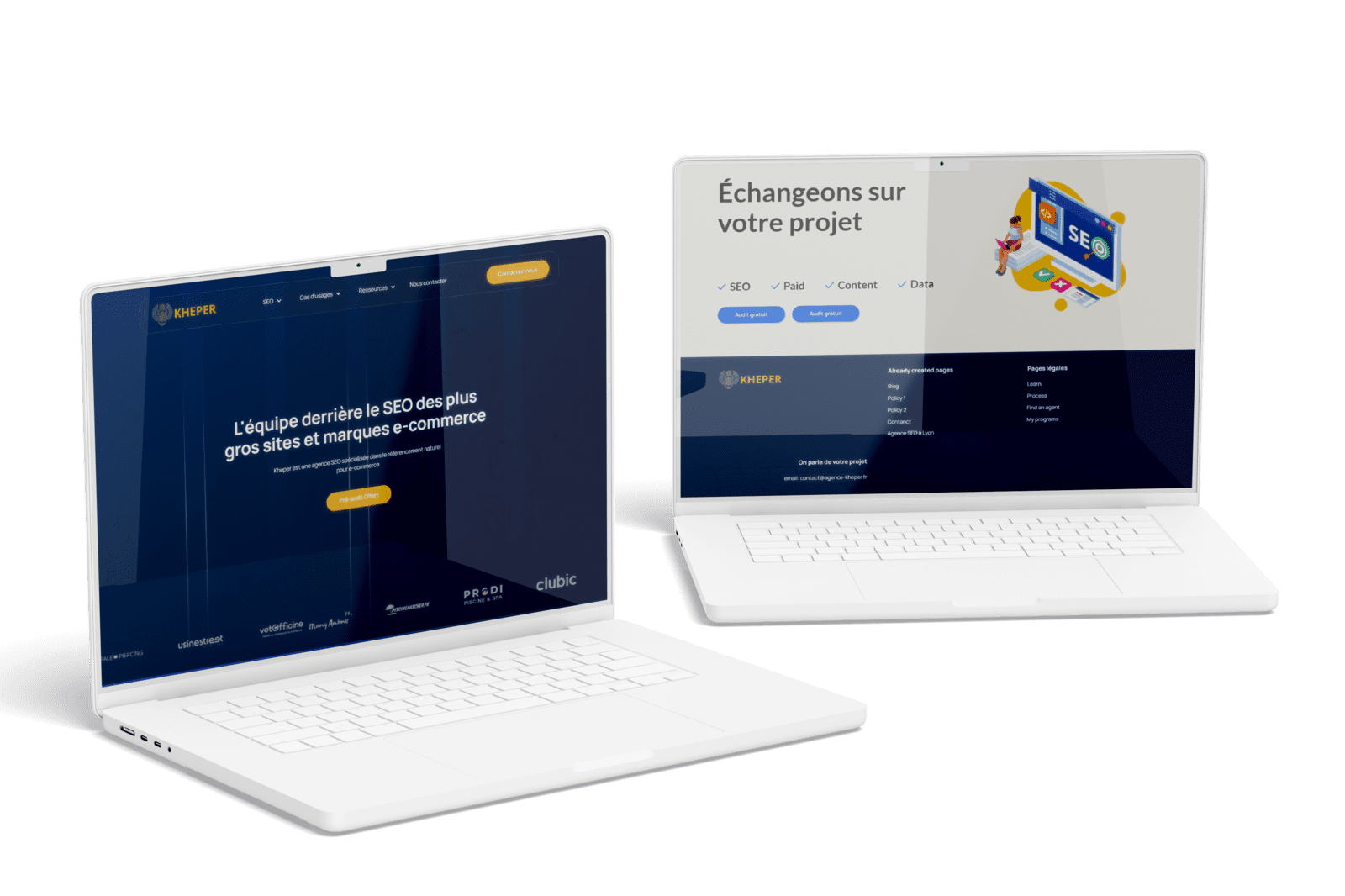
For Agence Kheper, YAVACADO migrated a WordPress website to Webflow, preserved the URL structure and on-page SEO, and configured CMS collections. The scope also included a redesigned homepage and a Google Reviews integration.
Check your own website
Your review checklistState your actual roleExplain two important decisionsWrite informative image captionsSeparate reported results from measured resultsUse these checks as you review. Selections are not saved.
Put it into practice
You have a successful launch and positive client feedback, but no analytics access. What should the results section say?
Show the suggested approach
Describe the completed scope, the working capabilities and the client’s feedback with attribution. For example, explain that the team can publish through CMS templates. Do not turn a successful launch into an unmeasured increase in sales or traffic.
Continue reading
Webflow vs WordPress: Compare the Workflow Before Choosing the Platform
References
Discuss your website
Bring your current website and the task you want to improve. YAVACADO can help define the content, design and implementation work needed for the next step.
FAQs
Can we write a case study without performance metrics?
Should we include every project screen?
Can we edit a client testimonial?
Campaign Landing Pages: Keep the Promise from Ad to Enquiry
12/8/25
4
min to read
A Website Analytics Plan: Measure the Journey to a Useful Enquiry
1/19/26
4
min to read
How to Write a Website Redesign Brief That Prevents Rework
11/10/25
4
min to read
Webflow CMS Reference Fields: Model Relationships Before Importing Content
1/5/26
4
min to read
Relevant project
WordPress to Webflow Migration for an SEO Agency
Tech
WordPress to Webflow migration + website design. L'équipe derrière le SEO des plus gros sites et marques e-commerce. Kheper est une agence SEO spécialisée dans le référencement naturel pour e-commerce.
Agence Kheper


LET’S WORK TOGETHER
LET’S WORK TOGETHER
LET’S WORK TOGETHER
LET’S WORK TOGETHER
LET’S WORK TOGETHER
LET’S WORK TOGETHER
LET’S WORK TOGETHER
LET’S WORK TOGETHER
Testimonials
What our clients say
A web design agency that cares about you and your brand, no matter the size or what industry your business is in.

YAVACADO turned a complex booking process into one clear platform. Our team can manage tours and content in Webflow, while parents can book and pay securely through WayForPay. The result is easy to operate and built around the needs of the Ukrainian market.

The website captures the premium feel of our brand perfectly. From the design to the multilingual functionality and payment integration, every detail was delivered to a very high standard.

Excellent implementation of our Figma design in Webflow. The final website feels fast, polished, and exactly aligned with the premium fintech experience we wanted.
.png)
The funnel feels significantly more polished than the original concepts and was delivered in a format our internal team could immediately continue working with. Smooth process and excellent execution.

Working with YAVACADO was a fantastic experience. They understood both the technical requirements and the business goals, delivering a fast, polished website that's easy to manage and built to generate qualified leads.

Impressive speed and quality. The landing page was delivered in just hours and looks clean, professional, and ready to use.

The turnaround was incredibly fast, and the result looks clean and professional. The site reflects our firm perfectly and was delivered exactly on time.

The YAVACADO team helped us present FromLab2Jab’s complex services in a clear and professional way. The structure, CMS, and filtering system make it easy for our team to manage and scale the content.

The final website matched the Figma design with impressive accuracy. The animations, sticky sections, and overall Webflow execution made the project feel polished and high-end.
%2520(1).png)
YAVACADO delivered a powerful, scalable platform that fully supports our operations. The CMS structure, CRM integrations, and automation tools significantly improved how we manage inquiries and camp programs.

The phased design and development approach made everything clear and efficient. The team delivered a professional SaaS website on time, and the training support helped us manage content confidently

The platform works exactly as we envisioned — secure, structured, and scalable. Subscription management and report access are fully automated, and everything runs smoothly.

The Webflow build perfectly matches the AI design and feels even better in motion. Everything from CMS to animations works smoothly—great work!


The redesign gave our website a completely new look. The layouts feel modern, the services are presented much clearer, and the site works perfectly on mobile.

The redesign elevated our corporate presence and made content much easier to manage. The Feensweet filtering and CRM integration streamlined our user experience and lead flow — great implementation!

%25201.png)
